


By Tom Hermstad, CEO of HD Tech — We manage your tech so you can manage your business.
If you handle Controlled Unclassified Information (CUI) and you’re playing with Copilot or Claude in a commercial tenant, you’re not “innovating” — you’re risking contracts and future eligibility.
Can defense contractors use AI and still stay CMMC compliant?
Yes — but only when AI tools like Microsoft Copilot and Claude run inside a properly scoped and configured CUI environment that aligns with NIST SP 800‑171, DFARS 252.204‑7012, and CMMC 2.0 requirements.
For most of the Defense Industrial Base (DIB), that means Microsoft 365 GCC High or equivalent sovereign environments, with hard boundaries, documented controls, and real monitoring — not “we turned it on and hope it’s fine.”
Public AI tools are not appropriate for CUI, ITAR/EAR data, or anything that touches export‑controlled technical information.
Is Microsoft Copilot allowed for DoD contractors?
Copilot can be used by defense contractors when:
- It’s deployed in a GCC High (or appropriate government cloud) tenant, and
- The tenant and Copilot configuration actually map to your NIST SP 800‑171 and CMMC Level 2/3 control implementation.
Just moving to GCC High doesn’t “auto‑certify” you. GCC High is an input to your compliance program — you still have to design enclaves, enforce access controls, log activity, protect endpoints, and document how controls are met.
Standard commercial Microsoft 365 is typically not sufficient for DoD‑regulated workloads that involve CUI or ITAR/EAR data.
The biggest AI compliance mistake defense contractors make
The biggest mistake I see is simple:
Allowing employees to use public AI tools for proposal drafting, engineering discussions, or contract analysis with no guardrails.
Even a small paste of design details, controlled drawings, or contract language can expose CUI or export‑controlled information. That’s exactly the kind of thing C3PAOs, primes, and the DoD will ask about when they review your environment and incident history.
It’s not if someone tries to “just get help from ChatGPT” — it’s when. Don’t be a casualty.
Why AI adoption is rising across the Defense Industrial Base
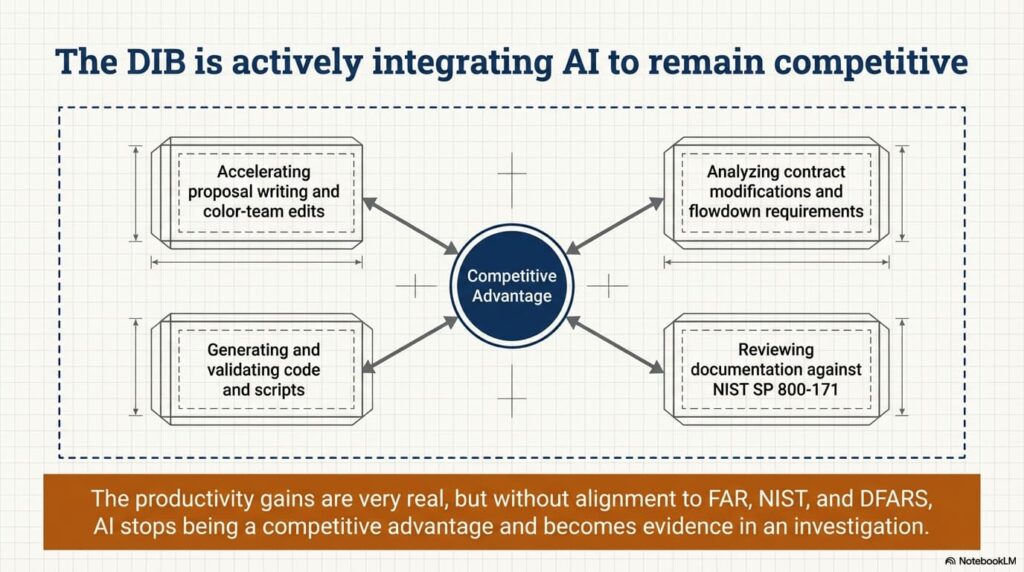
Across the DIB, contractors are exploring AI to:
- Accelerate proposal writing and color‑team edits
- Analyze contract modifications and flowdown requirements
- Generate and validate code and scripts
- Review documentation against NIST SP 800‑171 and internal control sets
- Improve internal communication and meeting summaries
The productivity gains are very real.
But so is the compliance exposure. Any AI implementation that touches CUI or CDI must live inside — and be governed by — the same frameworks you already know:
- FAR 52.204‑21 (basic safeguarding)
- NIST SP 800‑171
- DFARS 252.204‑7012
- CMMC 2.0 Level 2 or 3
- ITAR/EAR export controls where applicable
Without that alignment, AI stops being a competitive advantage and starts being evidence in somebody else’s investigation.
GCC High: the foundation for secure AI in DoD environments
What makes GCC High different from commercial Microsoft 365?
GCC High is designed for organizations handling CUI, ITAR/EAR data, and other sensitive government workloads.
Key distinctions include:
- U.S.‑based data residency in dedicated infrastructure
- Screened U.S. persons supporting the environment
- Alignment with DFARS 252.204‑7012, NIST SP 800‑171, and CMMC expectations
- Enhanced logging, isolation, and security controls tuned for federal workloads
For serious DoD support, GCC High isn’t a “nice to have” — it’s foundational infrastructure. But it’s not magic; compliance still comes down to how you configure and operate it.
Why Copilot must be deployed inside GCC High
Enabling Copilot in a commercial tenant doesn’t suddenly make it CMMC‑ready. It just increases your attack surface.
When properly deployed and scoped inside GCC High, Copilot can:
- Operate only against secure SharePoint, OneDrive, and Teams sites in your CUI enclave
- Respect existing role‑based access controls and security groups
- Maintain detailed audit logs of AI interactions for review and forensics
- Prevent your organizational data from being used to train public models
Those distinctions matter when a C3PAO, prime contractor, or government auditor asks you to “show your work” on AI data flow, logging, and incident response.
Using Claude securely in a CMMC‑aligned environment
Claude is powerful for complex reasoning, long‑form analysis, and development support. Engineering teams like it because it handles large context windows — big code bases, long documents, multi‑step reasoning.
But in the defense world, “where” and “how” you run Claude is everything. You must not expose:
- CUI (designs, drawings, requirements, test data)
- ITAR/EAR‑controlled technical data
- Sensitive system architecture or network diagrams
- Proprietary or competition‑sensitive technical documentation
Best practices for Claude in defense environments
If you’re going to use Claude, treat it like any other system in scope:
- Restrict usage to approved datasets and projects
- Implement a formal AI Usage Policy that references NIST SP 800‑171 and CMMC controls
- Log and monitor AI interactions (who, what, when, from where)
- Validate all AI‑generated outputs — no copy‑paste into production systems
- Keep AI tied into your identity, MFA, and least‑privilege model
AI outputs can sound authoritative and still be incomplete or wrong. AI is assistive — not authoritative. Your contracts and your CMMC score belong to you, not the model.
Common AI use cases for defense contractors
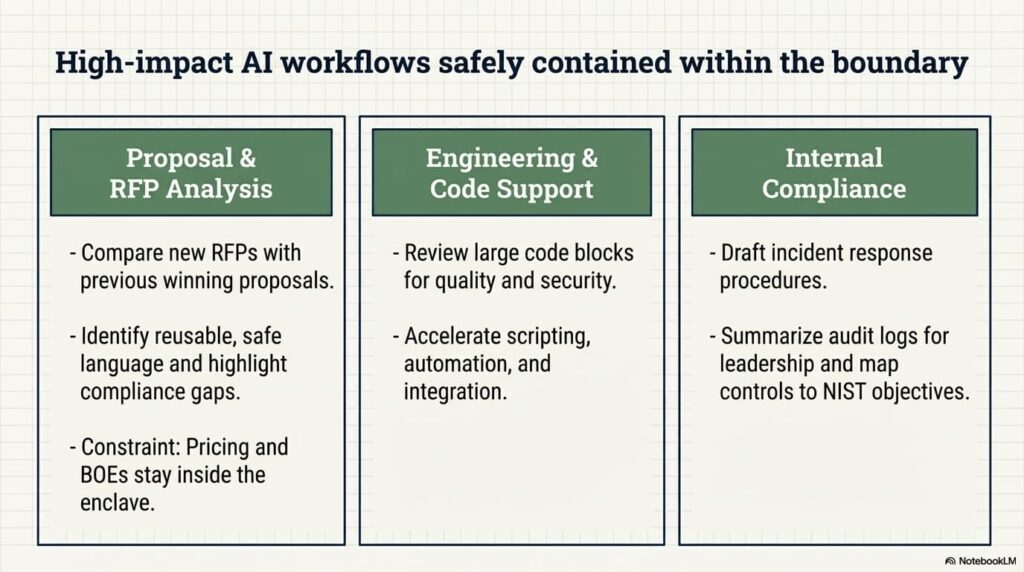
Proposal & RFP analysis
Inside a compliant tenant, AI can help teams:
- Compare new RFPs with previous winning proposals
- Identify reusable but safe language
- Highlight potential compliance gaps or missing artifacts
- Shorten drafting timelines and color‑team cycles
Remember: proposals and BOEs often contain CUI and proprietary pricing. They stay inside the CUI enclave — not in public tools.
Engineering & code support
Developers are already using AI within secure environments to:
- Review large blocks of code for quality and security issues
- Suggest improvements or refactors
- Generate KQL queries for Microsoft Sentinel and other tools
- Accelerate scripting, automation, and integration work
Claude Code and Copilot can significantly improve engineering efficiency — but only when wired into compliant infrastructure with proper scoping, logging, and review.
Internal compliance documentation
AI can assist with:
- Drafting and updating incident response procedures
- Summarizing audit logs for leadership
- Mapping controls to NIST SP 800‑171 and CMMC objectives
- Preparing for CMMC readiness assessments and POA&M updates
Compliance documentation often reveals how your environment really works — architecture, tools, gaps. Treat it as sensitive and keep AI operations inside your governed boundary.
The AI Usage Policy: your first line of defense
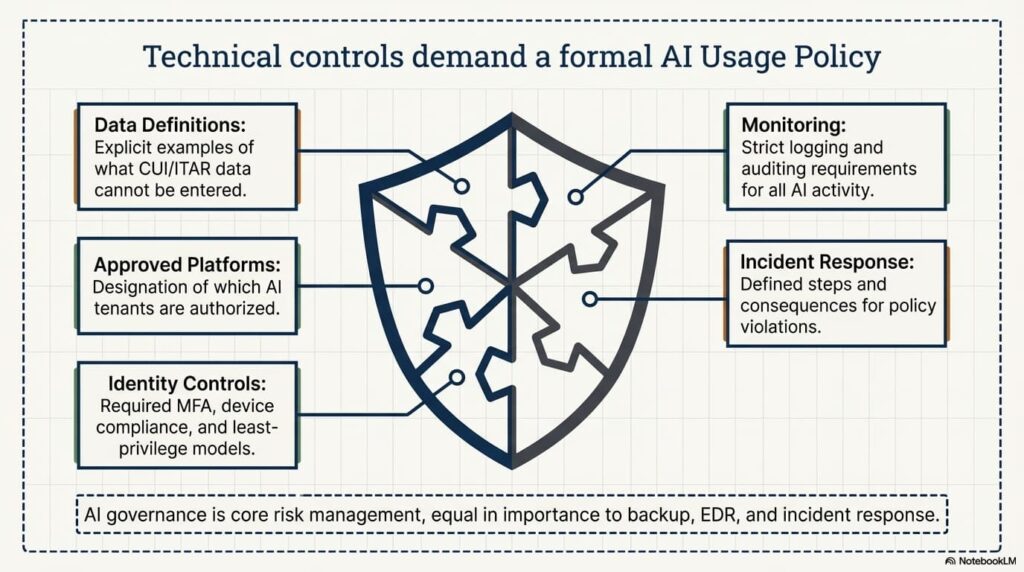
Before you flip the switch on Copilot, Claude, or any other AI tool, you need a formal AI Usage Policy that fits into your overall SSP and policy stack.
At a minimum, it should clearly define:
- What data may and may not be entered into AI systems (with CUI/ITAR examples)
- Which AI platforms and tenants are approved for CUI work
- Required MFA, device compliance, and identity controls
- Logging and monitoring requirements for AI activity
- Incident response steps and consequences for violations
If your organization handles CUI, AI governance is not optional. It’s core risk management — right next to backup, EDR, and incident response.
Why choose HD Tech for secure AI deployment?
HD Tech delivers comprehensive managed IT services and cybersecurity for growing businesses nationwide. We’re based in Orange County, California, and support defense contractors across the U.S. working toward or maintaining CMMC compliance.
Since the mid‑90s, we’ve helped regulated organizations align with:
- CMMC readiness requirements and ongoing gap remediation
- NIST SP 800‑171 controls and associated policies
- DFARS 252.204‑7012 cybersecurity clauses
- Secure Microsoft 365 and GCC High architectures
- AI governance and compliance frameworks layered onto existing controls
Our services include:
- 24/7 IT and security monitoring through our NOC and SOC
- Rapid incident response and containment
- GCC High architecture, migration, and enclave design
- Secure Copilot implementation in government clouds
- Ongoing compliance alignment and pre‑assessment support
We don’t just enable AI tools. We secure them, monitor them, and align them with your regulatory obligations so you can win and keep contracts.
Frequently asked questions about AI & CMMC
Can a small defense subcontractor use AI and still meet CMMC Level 2?
Yes — if AI tools operate inside a properly scoped, compliant environment (such as GCC High) and are governed by strong access controls, logging, and written policies that tie back to NIST SP 800‑171 and CMMC.
CMMC doesn’t care about company size. It cares about how you protect CUI.
Is public ChatGPT safe for defense‑related proposal writing?
No. Public AI platforms do not provide the data handling, logging, or contractual protections required under DFARS and CMMC when handling CUI or export‑controlled information.
If a document falls in your CUI boundary, it stays in your enclave — not in a public prompt box.
Does CMMC 2.0 specifically regulate AI usage?
CMMC doesn’t ban AI, but it absolutely regulates how systems that touch CUI must behave: access control, encryption, logging, monitoring, incident response, and more.
Any AI tool you use has to operate inside those controls. If it can’t, it’s out of scope — or out of bounds.
What happens if CUI is exposed through AI?
Exposure can trigger:
- DFARS 252.204‑7012 reporting requirements
- Prime contractor notifications and potential contract impact
- CMMC assessment findings and POA&Ms
- Reputational damage with customers and the DoD community
You will need to execute incident response, contain the issue, document impact, and prove you’ve closed the gap.
How do I verify that Copilot is configured correctly in a DoD environment?
You need a compliance‑focused review that looks at:
- Tenant type (GCC vs GCC High vs commercial)
- Data residency and CUI scoping
- Access controls, conditional access, and device compliance
- Logging and monitoring configuration
- How Copilot is limited to your CUI enclave and control set
“It’s turned on and users like it” is not an answer that will satisfy a C3PAO or prime.
Ready to deploy AI without risking your contracts?
AI can accelerate proposals, improve engineering workflows, and streamline compliance documentation.
But in the defense sector, implementation must be deliberate, documented, and secure. It’s not if someone will ask how you’re using AI with CUI — it’s when.
HD Tech delivers comprehensive managed IT services and cybersecurity for organizations nationwide. Based in Orange County, we support defense contractors across the U.S. navigating CMMC, DFARS, NIST SP 800‑171, and secure Microsoft 365/GCC High deployments.
If you’re ready to implement Copilot, Claude, or other secure AI tools inside a compliant GCC High environment — without gambling with your next audit or contract — call HD Tech today at 877‑540‑1684 or request a consultation.
Secure your AI strategy before your next audit depends on it.